
The best AI email assistants for small businesses
- AI Automation
- 8 min read
- Ahsan
If you’re on Google Workspace or Microsoft 365, the best AI email assistant is usually the one already in your plan. For Gmail, that’s Gemini in Gmail. For Outlook, it’s Copilot in Outlook. Add a dedicated assistant only if you need drafts that sound like you, an inbox that sorts itself or help booking meetings. Our pick for that is Fyxer, because it works in both Gmail and Outlook and never sends anything without you.
Tech Artisans is an ai automation agency: we set up assistants and the automation around them. This guide covers what we check before recommending one. Every price was checked on the vendor’s own page on 30 Sep 2026.
What is the best AI email assistant? How we picked
The best AI email assistant is the one that works inside the inbox you already use, drafts replies that sound like you, handles your data carefully and costs less than the time it saves. We judged every tool on 4 criteria:
- Works in your inbox. It runs inside Gmail or Outlook, or connects to them, so you don’t move your email somewhere new unless it’s worth it.
- Drafts in your voice. A good ai email writing assistant learns how you write. A generic one sounds like a brochure.
- Data handling. It says in writing whether it trains AI models on your email and whether it can send without you.
- Price. It costs less per month than an hour of your time.
Most lists of AI email assistants are written by companies that sell one, so we’ve noted what each tool won’t do as well.
One setup that works well for a small team on Google Workspace: Gemini in Gmail for thread summaries and Fyxer for drafts. A person reads every draft, fixes the details and then sends it.
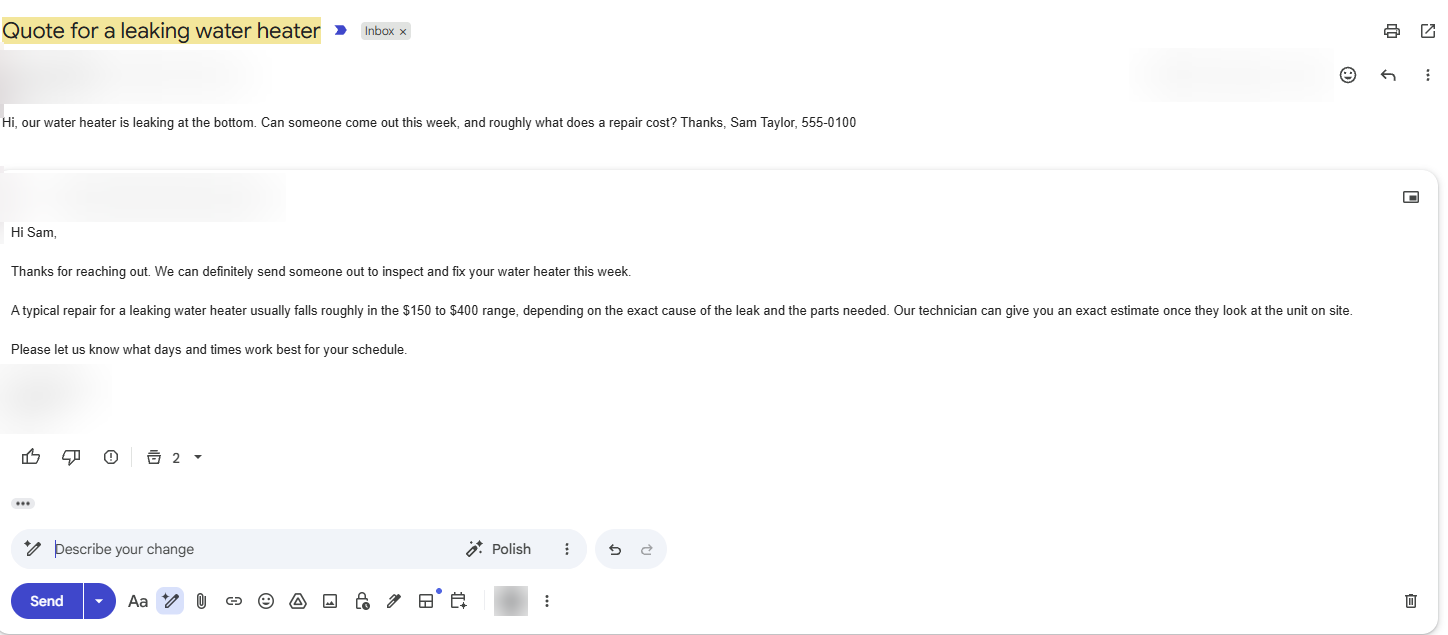 A test inquiry from a made-up customer, and the reply Gemini drafted in Gmail. It waits until a person checks it and presses send. The $150 to $400 repair range is the AI’s guess, the kind of detail a person has to check.
The best AI email assistants for Gmail
For Gmail, there are 3 picks worth your time: Gemini in Gmail, Fyxer and Shortwave.
1. Gemini in Gmail
Gemini in Gmail is the first thing to try if you’re on Google Workspace, because you’re already paying for it. It summarizes long threads, drafts and polishes replies, helps organize your inbox and proposes meeting times from your Google Calendar. It’s included from Business Starter, which is $7 per user per month on an annual plan.
What it won’t do: it won’t log a new inquiry in your CRM or chase a customer who went quiet.
2. Fyxer
Fyxer is the pick if you want drafts in your own tone waiting for you each morning. It drafts replies and labels your email automatically, in Gmail or Outlook. Pro is $32 per person per month billed annually, or $49 month to month, with a 14-day free trial and a free plan.
What it won’t do: send. Fyxer says it will never send an email on your behalf, so every draft waits for you.
3. Shortwave
Shortwave is an AI-first email app built for Gmail. You ask it questions about your inbox in plain English, and it drafts, sorts and searches for you. Business is $30 per seat per month, billed monthly, with a 14-day free trial.
What it won’t do: work with Outlook. Shortwave supports Gmail and Google Workspace accounts, not Microsoft 365 or Exchange. It’s also a new app to learn, not a button inside Gmail.
The best AI email assistants for Outlook
For Outlook, the 3 picks are Copilot in Outlook, Fyxer and Superhuman.
1. Copilot in Outlook
Copilot in Outlook is where to start on Microsoft 365, because the basics come with your business plan. Copilot Chat is available to users on a qualifying Microsoft 365 business plan, and it includes Copilot in Outlook. That gives you thread summaries, Draft with Copilot and Coaching by Copilot, which suggests fixes for tone and clarity.
The full Microsoft 365 Copilot Business add-on is listed at $21 per user per month paid yearly (shown at $18 as a promotion when we checked), or $25.20 paid monthly.
What it won’t do: without the paid add-on, it won’t schedule meetings for you from chat.
2. Fyxer
Fyxer works the same way in Outlook as in Gmail: drafts in your tone, automatic labels, and nothing sent without you. The prices above apply.
3. Superhuman
Superhuman Mail is a fast email app with AI built in, and it works with Gmail or Outlook. Mail comes with the Business plan, at $33 per member per month billed annually or $40 monthly.
What it won’t do: stay cheap. It’s the priciest pick here, and like Shortwave, it replaces your email app, so budget a week to get used to it.
AI email and calendar assistants
If booking meetings is what clogs your inbox, you want an ai email and calendar assistant that can see your availability. There are 3 good options:
- Gemini in Gmail proposes meeting times based on your Google Calendar.
- Copilot in Outlook can schedule a meeting with up to 2 other people from chat, but only with a Microsoft 365 Copilot license and the new Outlook for Windows.
- Reclaim.ai adds scheduling links and protects focus time on Google Calendar or Outlook. Lite is free; Starter is $10 per seat per month billed yearly, or $12 month to month.
The honest limit: a scheduling assistant is only as good as your calendar. If half your appointments live in your head, it will double-book you.
What an AI assistant for email can read, and how to check
An AI assistant for email can read every message in the account you connect, so the real question is what it does with them. Check 3 things on the vendor’s privacy or security page before you connect it:
- Does it train AI models on your email? Look for a plain yes or no.
- Can it send without you? Drafts-only is safer for customer email.
- Who else sees the data? Look for a list of subprocessors and how long data is kept.
Here’s what the vendors in this guide say:
- Google: your content isn’t human-reviewed or used for generative AI model training outside your domain without your permission.
- Microsoft: prompts, responses and data accessed through Microsoft Graph aren’t used to train foundation models.
- Fyxer: your data is never used to train third-party AI models, and it never sends email on your behalf.
- Superhuman: neither Superhuman Mail nor any of its vendors trains on your data.
- Shortwave: your data is never used to train third-party LLMs, and it keeps your data only as long as it needs it to run the service or as the law requires. You can delete your account and its data at any time.
If you handle health, legal or financial records, talk to whoever manages your compliance before you connect any assistant. This guide isn’t legal advice.
Even with good settings, drafts go wrong. For example, an assistant can pull a discount or an old price from a past thread and offer it in a new reply. The fix is a simple rule: any draft that mentions a price, a date or a refund gets a person’s check before it goes out.
When you need automation, not an assistant
You need automation, not an assistant, when the work happens after the reply. An assistant drafts the reply. Logging the lead, tagging it and following up 3 days later is crm automation, and that’s the part we build and run.
There are 3 signs you’ve outgrown an assistant:
- Leads get lost. A new inquiry arrives, you reply, and it never makes it into your CRM or your quote list.
- Follow-ups depend on memory. Nobody chases the customer who went quiet after the estimate.
- Attachments pile up. Invoices, forms and purchase orders sit in the inbox until someone types them into another system. That’s a job for data entry automation, not a smarter reply.
Our package for this is called Inbox & Admin Autopilot: it sorts the inbox, drafts replies, files documents and keeps your CRM up to date. You won’t get homework from us. We build it, run it and explain it.
In practice, that looks like this: a new inquiry is added to the CRM and tagged by the service it asks about, a reply is drafted for a person to review, and a follow-up goes out after about 3 days if the customer hasn’t answered.
If email is only one of the jobs eating your week, our guide to ai tools for business covers the phone, content and admin too.
FAQ
Is there a free AI email assistant?
Yes. If you already pay for Google Workspace or a Microsoft 365 business plan, Gemini in Gmail or Copilot in Outlook comes at no extra cost. Fyxer also has a free plan with a monthly credit allowance, and Reclaim.ai’s Lite plan is free for calendar scheduling. Free plans are fine for a trial, but check their data terms first.
Is it safe to give an AI access to my inbox?
Yes, if you choose carefully. Pick a vendor that says in writing it won’t train AI models on your email, keep sending in your own hands and connect only the accounts that need it. If your inbox holds health, legal or financial records, check with whoever handles your compliance before you connect anything.
Can an AI email assistant send emails on its own?
Yes, an automation can send email on its own, but most assistants stop at a draft, and that’s the safer setting for customer email. Fyxer, for example, says it never sends on your behalf. If you want automatic sending, keep it to predictable messages, like a booking confirmation, and test it first.
Does Gemini in Gmail cost extra?
No. On Google Workspace, Gemini in Gmail is included from the Business Starter plan, which was $7 per user per month on an annual plan when we checked on 30 Sep 2026. A personal Gmail account needs an eligible Google AI plan to get it. Check Google’s pricing page for the current rates.
Which AI email assistant works with Outlook?
Copilot in Outlook is the obvious start, because the basics come with Microsoft 365 business plans. Fyxer and Superhuman also work with Outlook. Shortwave doesn’t: it supports Gmail and Google Workspace accounts only. If you’re on Outlook and want drafts in your own voice, try Fyxer’s free trial first.
Will customers know a reply was AI-written?
No, not if you read and edit every draft before it goes out. Unedited AI replies tend to give themselves away: they’re a little too polite, a little too long and light on specifics. Add the detail only you know, like the job date or the part number, and nobody will notice.
Not sure where AI fits in your inbox?
Most owners aren’t. Tell us how your week goes, and we’ll point to the 2 or 3 inbox jobs worth handing over first, whether that’s an assistant, an automation or both.

Ahsan Shahid, CEO
Ahsan spent 12+ years as a lead developer on Drupal and WordPress projects before building the team behind Tech Artisans, and still reviews the technical work on client projects.
More about us