
n8n pricing explained: cloud vs self-hosted for a small business
- AI Automation
- 8 min read
- Ahsan
n8n pricing comes in 2 forms. n8n Cloud is a monthly plan priced by workflow executions, and it starts at $24 a month for 2,500 executions ($20 a month if you pay yearly), according to n8n’s pricing page, checked 30 September 2026. The self-hosted Community Edition is free to use for your own business, but you pay for the server, the AI usage and the upkeep.
That second part is where the bill hides. We build and run n8n workflows as an ai automation agency, so below we add up the whole bill, not just the plan.
n8n pricing plans at a glance
n8n lists 4 plans, and every one includes unlimited users, unlimited workflows and every integration. They differ by monthly executions and a few extras for teams, and Enterprise is priced by n8n’s sales team.
| Plan | Price, billed monthly | Price, billed yearly | Executions a month | Limits |
|---|---|---|---|---|
| Starter | $24 a month | $20 a month | 2,500 | 5 runs at once, 1 shared project, forum support |
| Pro | $60 a month | $50 a month | 10,000 | 20 runs at once, 3 shared projects, admin roles, 5 days of workflow history |
| Pro, larger tier | $145 a month | about $121 a month | 50,000 | 50 runs at once |
| Business | about 17% more than yearly | $800 a month | 40,000 | Self-hosted only: SSO, Git version control, separate test and live environments |
| Enterprise | Contact sales | Contact sales | Custom | Dedicated support with an SLA, 200+ runs at once |
Prices in US dollars, checked 30 September 2026.
2 details trip people up. First, the Business plan isn’t hosted by n8n today: you buy a license and run it on your own server. Second, the Assistant credits on Starter and Pro pay for n8n’s AI Assistant, the helper that builds workflows with you. They don’t pay for AI steps inside your workflows.
What counts as an execution
An execution is 1 complete run of a workflow, however many steps it has.
For example, a lead fills in the form on your website. The workflow adds them to your CRM, sends them a confirmation email and posts a note to your team chat. That’s 1 execution, not 3.
Zapier and Make count each step instead.
Failed executions don’t count against your monthly allowance, and on a paid plan, test runs you start by hand in the editor keep working even after you hit your limit.
Self-hosted n8n: what’s free and what isn’t
Self-hosted n8n is free software, but you still pay to run it. n8n’s Community Edition runs on your own server without a license key and includes almost the full feature set.
The license in plain English. n8n uses its own Sustainable Use License. If only you or your staff create or change the workflows, n8n’s FAQ says it’s free. What you can’t do is host n8n as a service where your customers build their own workflows. A plumber running follow-ups for their own jobs is fine. A software company reselling n8n inside its product needs a commercial agreement.
What needs a paid plan. The free edition leaves out the team tools: shared workflows and credentials, projects, single sign-on, separate test and live environments, Git version control and external secret stores. For a one-owner business that’s rarely a problem. For a team of 10 who all edit workflows, it can be.
The server bill. You rent a small cloud server. For example, a DigitalOcean Basic Droplet with 2 GB of memory costs $12 a month, and weekly backups add 20% of the server price. For one small business running a single n8n instance, 2 GB of memory and 1 or 2 vCPUs is a sensible starting size.
The costs nobody puts in the table
The plan price is only 1 of 5 lines on a real n8n bill. There are 4 costs that don’t show up on n8n’s pricing page:
- AI model usage. If a workflow uses AI to read an email or draft a reply, the AI provider charges by the amount of text (counted in tokens). You pay that with your own AI provider account, or on Starter and Pro you can prepay n8n’s Gateway credits, which pass through each provider’s rates. That’s what people usually mean by n8n ai pricing.
- Server and backups. On self-hosted n8n this is your job. On n8n Cloud it’s included in the plan.
- Updates. n8n ships new versions often. Someone has to apply them, test that your workflows still run and roll back when one doesn’t.
- Your time, or ours. Building, testing and fixing workflows takes hours. That’s usually the largest line, and it’s the one owners forget.
n8n price for 3 typical small businesses
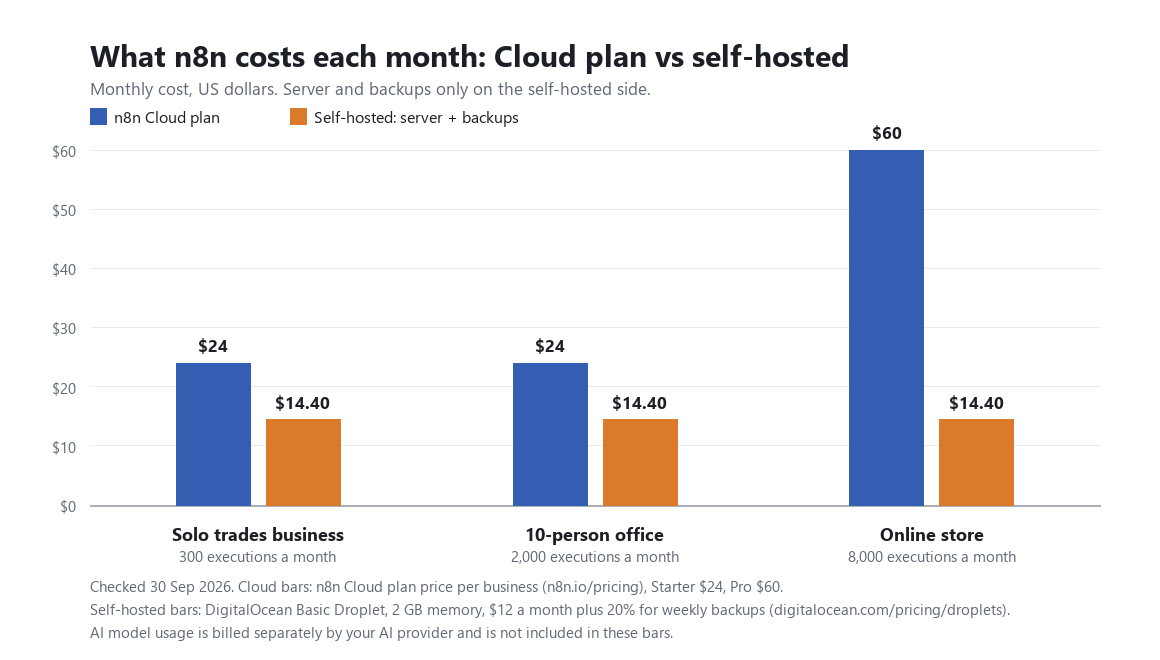
In the 3 examples below, the n8n price lands between $24 and $60 a month on Cloud, plus a few dollars of AI usage. The estimates use only published prices. The volumes are assumptions, so swap in your own.
For AI, each example assumes an AI step that reads about 1,000 tokens and writes about 300, on Anthropic’s Claude Haiku 4.5 at $1 per million input tokens and $5 per million output tokens. That works out to about $0.0025 per AI step.
| Business | Assumed volume | n8n Cloud | Self-hosted | AI usage |
|---|---|---|---|---|
| Solo trades business | 300 executions a month, all with 1 AI step | Starter, $24 a month | $12 server + $2.40 backups | about $0.75 |
| 10-person office | 2,000 executions a month, 1,000 with an AI step | Starter at $24, or Pro at $60 for admin roles and more history | $12 server + $2.40 backups | about $2.50 |
| Online store | 8,000 executions a month, 2,000 with an AI step | Pro, $60 a month | $12 server + $2.40 backups, likely more as volume grows | about $5 |
Prices from n8n and DigitalOcean, checked 30 September 2026.
The self-hosted column leaves out the hours. Plan for 1 to 2 hours a month for updates, backups and the odd broken workflow.
n8n vs Zapier and Make on price
n8n isn’t always the cheapest of the 3: it charges per run instead of per step, so it pulls ahead as workflows get longer, while Make’s low price per credit often wins on short ones. Compare that same lead workflow (form, CRM, email, team chat) on each:
- Zapier charges tasks. The trigger is free and each action step that runs is 1 task, so each lead uses 3 tasks. Paid plans start at $19.99 a month billed yearly for 750 tasks.
- Make charges credits. The trigger check is 1 credit and each action is 1 more, so each lead uses 4 credits. Core costs $16 a month, or $12 a month billed yearly, for 10,000 credits.
- n8n charges executions, so each lead is 1 execution. Starter covers 2,500 of them for $24 a month.
At 2,500 leads a month, that’s 2,500 executions on n8n (Starter, $24), 10,000 credits on Make (Core, $16) and 7,500 tasks on Zapier, which needs its 10,000-task Professional tier: $129 a month billed yearly, or $193.50 billed monthly. Add 6 more steps to the workflow and Make’s count grows to 25,000 credits while n8n’s stays at 2,500.
Zapier still connects to more apps and is easier to learn. Our guide to no-code automation platforms compares them on more than cost.
When self-hosting is a bad idea
Self-hosting n8n is a bad idea when nobody owns the server. There are 3 situations where we’d tell you to pay for Cloud instead:
- No one to patch it. An unpatched server that talks to your CRM and inbox is a security risk, not a saving.
- Customer data you can’t lose. If workflows touch orders, payments or client records, a crashed server with no tested restore is a bad week.
- No backups. Backups you’ve never restored aren’t backups.
n8n deletes old execution data by default, after 14 days or 10,000 runs. If someone switches that off to keep a longer history, the database keeps growing until the server runs out of storage and workflows stop.
n8n Cloud has limits too. It stores data on n8n’s servers in Frankfurt, Germany, and heavy workflows can hit the memory cap on smaller plans.
The license is the cheap part
The license is the small part of the bill. The time to build, test and keep workflows running is the big part, which is why most owners hand ai workflow automation to someone who does it daily.
That’s what we do: we pick the tool, set it up, connect it to your CRM, calendar and inbox, and keep it running. If your leads and follow-ups live in a CRM, our crm automation work usually starts there. We quote after a short call, because every business needs different workflows.
FAQ
Is n8n free?
Yes, if you host it yourself. The Community Edition is free for your own internal business use under n8n’s Sustainable Use License. You still pay for a server, backups, any AI usage and the time to keep it updated. n8n Cloud is a paid monthly plan priced by the number of workflow executions.
Is n8n cheaper than Zapier?
Yes, for most multi-step workflows. Zapier counts every action step as a task, while n8n counts a whole workflow run as 1 execution, whatever its length. For a 2-step Zap that runs a few times a day, the gap is small. Zapier still wins on app coverage and ease, which can matter more than the monthly price.
Does n8n charge for AI?
No, not directly, unless you choose to. You connect your own OpenAI, Anthropic or Google account and pay that provider for usage. On Cloud Starter and Pro, you can instead prepay n8n’s Gateway credits, which bill each AI request at the provider’s rates. The Assistant credits on each plan cover n8n’s workflow-building assistant only.
What happens if I go over my executions?
On n8n Cloud, new executions fail with an “Execution limit reached” error until your allowance resets at the start of the calendar month or you upgrade. Nothing queues up, and failed runs don’t re-run by themselves. Your workflows stay switched on. n8n gives a one-time courtesy reset on Trial, Starter and the 10,000-execution Pro plan.
Can I move from cloud to self-hosted later?
Yes. n8n Cloud owners can download their workflows from the admin dashboard and import them into a self-hosted instance. n8n’s export docs say the file carries only credential names and IDs, not the logins, so plan to reconnect your apps and test every workflow after the move. After a free trial ends, you have 90 days to download your workflows.
Do I need a developer to run n8n?
No, not for n8n Cloud. n8n hosts, updates and backs it up, and you build in a visual editor. Self-hosting is different. You’ll need someone comfortable with servers, Docker, updates and restores. Complex workflows also get easier with someone who can write a little JavaScript, because n8n lets you drop code into any step.
Not sure n8n is the right tool?
Ask us before you build. Tell us which tasks eat your week, and we’ll tell you whether n8n, Zapier or Make fits, and what it would really cost to run.

Ahsan Shahid, CEO
Ahsan spent 12+ years as a lead developer on Drupal and WordPress projects before building the team behind Tech Artisans, and still reviews the technical work on client projects.
More about us