
SEO tools for small business: the short list
- SEO
- 8 min read
- Ahsan
Most small businesses need 4 free SEO tools: Google Search Console, Google Business Profile, Google Analytics and Bing Webmaster Tools. Together they show which searches find you, which pages get clicks, what’s broken, and how many people call or ask for directions. Pay for SEO software only when you research keywords or track competitors every month. This short list of SEO tools for small business covers what each one shows, what it costs and how to use them.
The best free SEO tools for small business
The best free SEO tools for small business come from the search engines themselves, because they report what Google and Bing actually saw on your site. There are 5 worth setting up, and none of them costs anything.
- Google Search Console. Its Performance report shows clicks, impressions, click-through rate and average position, broken down by the searches people typed and the pages they landed on. It keeps the last 16 months of data, so you can compare this October with last October. The Page indexing report lists pages Google hasn’t indexed and the reason for each, and the URL Inspection tool lets you ask Google to crawl a page again after you fix it.
- Google Business Profile. If you serve customers in an area, this matters as much as your website. The performance report shows profile views, the search terms people used to find you, calls, direction requests and website clicks. Only owners and managers of the profile can see it, so verify your Google Business Profile first if you haven’t.
- Google Analytics. Analytics shows what happened after the click: which pages people read, where they left, and whether they filled in your form (once you set that up as an event). Google doesn’t charge for it.
- Bing Webmaster Tools. Bing’s version of Search Console. The audience is smaller than Google’s, but setup is quick: you can import your site from Google Search Console and it’s verified automatically. It also has a site scan that crawls your pages and lists SEO problems.
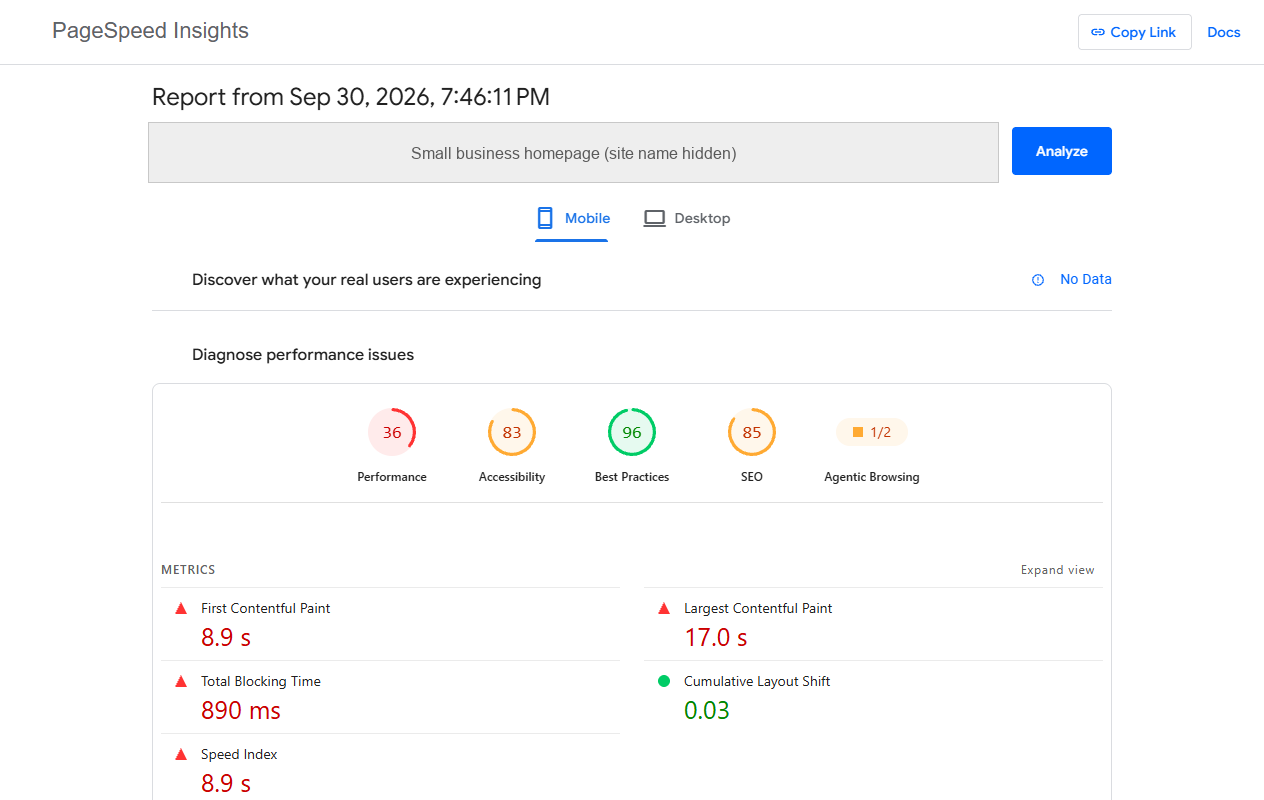
- PageSpeed Insights. Paste in a page address and it reports Core Web Vitals (LCP, INP and CLS) from real Chrome users over the previous 28 days, plus a Lighthouse test with specific fixes. Small sites often don’t have enough visitors for the real-user data, so you’ll only see the lab test.
When to pay for SEO software: 3 signs you’ve outgrown the free tools
You’ve outgrown the free tools when you need data about searches and sites that aren’t yours. There are 3 signs it’s time to pay:
- You want new topics, with numbers. You publish every month and want search volume before you start writing. Free tools can’t estimate volume for searches you don’t rank for yet.
- You want to see what competitors rank for. Which searches bring traffic to the business down the street, and who links to them. No Google tool shows another site’s data.
- You track a list of keywords every week. Search Console gives an average position across all searches. If you need a daily position for 50 set keywords, that’s a rank tracker’s job.
If none of these sounds like you, keep your money. The free tools cover the job.
The best SEO software for small business, if you pay
The best SEO software for small business is one all-in-one suite, not three, and you cancel it the month you stop opening it. There are 3 worth comparing. Prices below are from each vendor’s own pricing page, checked 30 September 2026:
- Semrush. Strongest for keyword research and competitor research in one place, with a site audit and rank tracking included. The SEO plan is $139 a month, or $117.33 a month billed yearly. There’s also a free plan limited to 10 reports a day, enough to try it.
- Ahrefs. Best known for backlink data: who links to you and to your competitors. The Starter plan is $29 a month for keyword and competitor lookups, and the Lite plan is $129 a month. A free Ahrefs account shows data for your own site.
- Moz Pro. Moz pitches its Standard plan “for small businesses that just need the basics of SEO”. It’s $99 a month, or $79 a month paid yearly.
A lean setup that covers most needs: the free Google and Bing tools above for the everyday work. If you add one paid tool, make it Semrush, because keyword research, competitor data and rank tracking sit in one plan.
What SEO tools can’t do
SEO tools show you problems. They don’t write the page, earn the review or fix the site. Google says it plainly: it doesn’t evaluate or endorse third-party SEO tools, and those tools don’t have access to Google’s internal ranking data.
That has 4 practical results:
- The score isn’t Google’s. An “SEO score” of 72 out of 100 is the vendor’s own formula. Google doesn’t use it.
- Audits over-report. A site audit on a 20-page site can list dozens of warnings. Most don’t matter. Fix pages that aren’t indexed, broken links and slow pages first.
- Keyword numbers are estimates. Volume and difficulty figures differ between tools for the same search. Use them to compare options, not as facts.
- The work is still yours. No tool writes a better service page, asks happy customers for reviews or fixes a slow theme.
AI tools don’t change this. They draft; someone who knows the business still checks every claim. A sensible split: AI drafts meta descriptions and page outlines, and a person checks every fact, price and claim before anything goes live.
A 30-minute monthly SEO routine
A 30-minute routine once a month, using only the free tools above, catches problems before they cost you calls. Book it for the first Monday of the month. There are 5 steps:
- Search Console Performance (10 minutes). Compare the last 28 days with the 28 days before. Sort queries by impressions. A search with lots of impressions and few clicks usually needs a clearer page title.
- Search Console Page indexing (5 minutes). Look for new reasons in “Why pages aren’t indexed”. A service page that drops out of the index is worth fixing today.
- Google Business Profile (5 minutes). Check calls, direction requests and website clicks against last month. Reply to any new reviews while you’re there.
- Google Analytics (5 minutes). Find the pages people land on before they contact you. Those are the pages to keep improving.
- PageSpeed Insights (5 minutes). Test your homepage and your busiest service page. Write down one fix for the month and leave the rest.
Once a quarter, log in to Bing Webmaster Tools and run the same checks.
Here’s what that looks like on our own site:
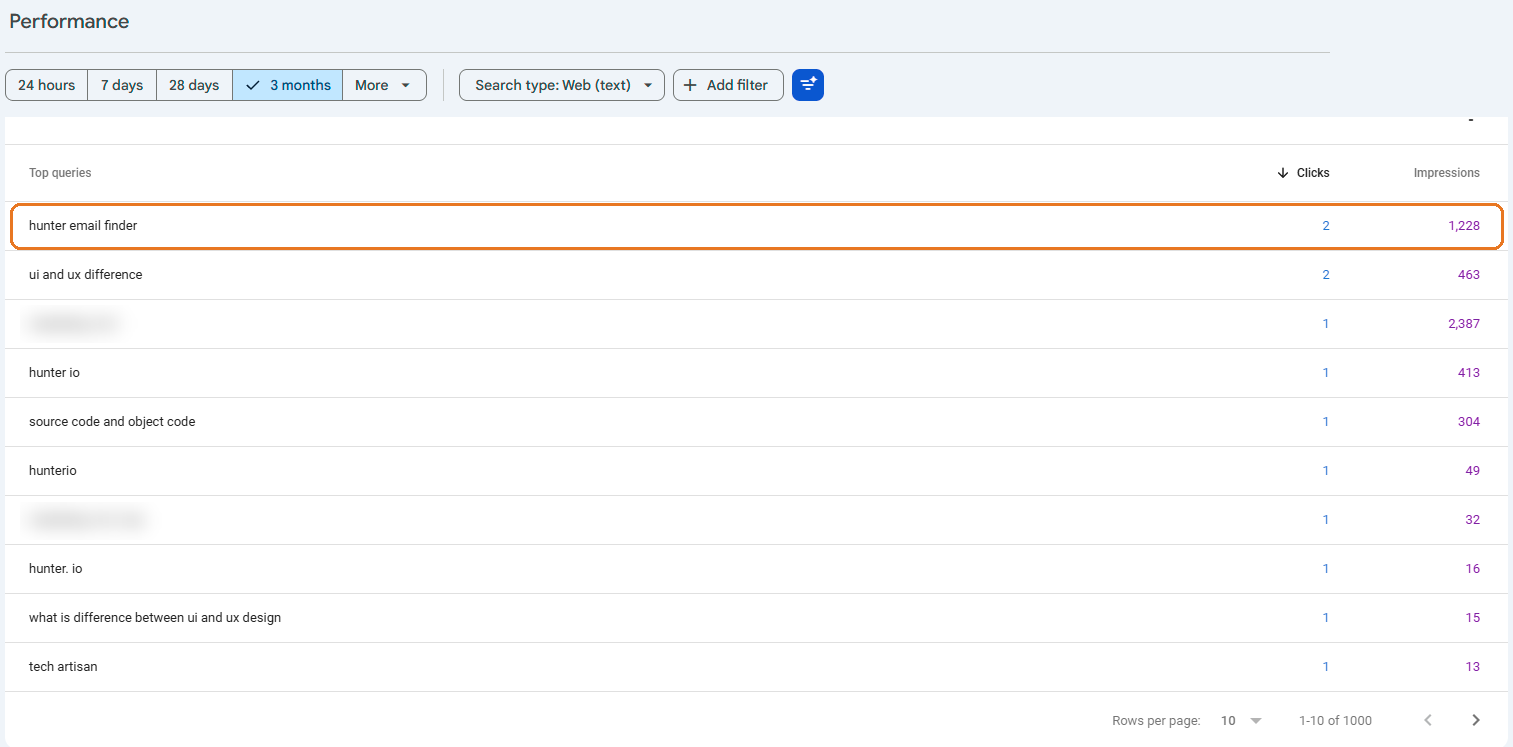 Our own Search Console, queries tab, last 3 months. The circled search, “hunter email finder”, shows up often but rarely gets the click.
It’s a common finding: a page appears for a search again and again, but few people click, because its title doesn’t match what they typed. Rewriting the title in the searcher’s own words is usually the fix. Compare the next 28 days with the 28 before to see whether it worked.
Is SEO worth it for a small business?
Yes, SEO is worth it for a small business when people search for what you sell and you can wait a few months for results. It’s a poor fit when you need customers this week. No one can guarantee a #1 ranking on Google, and Google warns owners to be wary of anyone who does.
It tends to pay off under 3 conditions:
- People search for your service. A plumber, a dentist or a roofer gets searched every day. A brand-new product category may not.
- You can give it months, not weeks. Plan on several months before new calls show up, and longer in busy cities or crowded trades. Anyone promising results within weeks is guessing.
- Someone keeps doing the work. A monthly routine beats a big push once a year.
If you serve one town or region, start with the Business Profile and a few strong service pages. Our guide to local SEO for small businesses walks through that order. If you’d rather hand it to a local SEO agency, our SEO pricing page explains what drives the cost.
Tools show you what’s wrong. Someone still has to fix it every month, and that’s the job you’d hand to an SEO company for small business.
FAQ
What is the best free SEO tool?
Google Search Console is the best free SEO tool for most small businesses. It shows the searches you appear for, how many people clicked, which pages Google hasn’t indexed and why. It’s the only tool with Google’s own data about your site. Set it up first, then add Google Business Profile if you serve customers in a local area.
Do I need Semrush or Ahrefs?
No, not at the start. Semrush and Ahrefs earn their price when you research new keywords, study competitors or track rankings every month. If you’re publishing a page now and then and checking Search Console, the free tools cover you. Try a free plan first and pay only when you hit its limits every week.
Is Google Search Console enough?
Yes, for tracking your own site, Google Search Console is enough for most small businesses. It covers searches, clicks, indexing and page problems. It can’t show competitors’ data or estimate volume for searches you don’t rank for yet. Pair it with Google Business Profile and Analytics, and you have what most owners need.
Can AI tools do my SEO?
No, not on their own. AI tools can draft pages, suggest titles and summarize a site audit, which saves time. They can’t check that a claim is true, earn reviews from real customers or decide which service matters most to your business. Treat AI as a fast first draft that a person who knows the business edits.
How much does SEO software cost?
SEO software for small business runs from free to a few hundred dollars a month. On 30 September 2026, Ahrefs Starter was $29 a month, Moz Pro Standard $99 and the Semrush SEO plan $139. Moz and Semrush cost less when paid yearly. Google Search Console, Analytics, Business Profile and Bing Webmaster Tools cost nothing.
Is SEO worth it for a small business?
Yes, if people search for what you sell and you can wait a few months. SEO brings customers who are already looking, and the pages keep working after you’ve paid for them. It won’t help if nobody searches for your service or you need sales this week. No one can honestly guarantee a #1 ranking.
Tell us what’s eating your time
If the monthly routine is the part that never happens, that’s normal. You run a business. We can set up these tools on your site, run the checks each month and fix what they find, so you get the calls without the homework.

Ahsan Shahid, CEO
Ahsan spent 12+ years as a lead developer on Drupal and WordPress projects before building the team behind Tech Artisans, and still reviews the technical work on client projects.
More about us