
AI tools for small business: what’s worth paying for
- AI Automation
- 9 min read
- Ahsan
Most small businesses need 3 or 4 AI tools for business, one for each job that eats your time. Start with the AI already inside the software you pay for: Gemini comes with Google Workspace, and Copilot Chat comes with Microsoft 365 business plans. Then add one tool for the phone or the inbox, because that’s where customers slip away. Most of the rest is optional.
Below: one pick and one alternative per job, a monthly bill built from list prices, and what to skip. Every price was checked on the vendor’s own pricing page on 30 Sep 2026, so check again before you buy.
Start with the AI you already pay for
Before you buy anything, check your email and office plan: Google and Microsoft both include AI in business plans now.
Google Workspace. Business Starter is $7 per user per month on an annual plan and includes Gemini in Gmail and the Gemini app. Business Standard is $14 and adds Gemini in Docs, Meet and more.
Microsoft 365. Copilot Chat is available to anyone on a qualifying Microsoft 365 business plan, and it includes Copilot in Outlook for summaries and drafts. The full Microsoft 365 Copilot Business add-on is listed at $21 per user per month paid yearly (shown at $18 as a promotion when we checked), or you can buy Business Standard with Copilot bundled at $23.50.
Your CRM. Search your CRM’s plan page for “AI” before you pay for a separate tool. It may already draft follow-ups or summarize calls.
What the built-in AI won’t do: it won’t answer your phone, and it won’t pass information between your other tools on its own.
The best AI tools for business, sorted by job
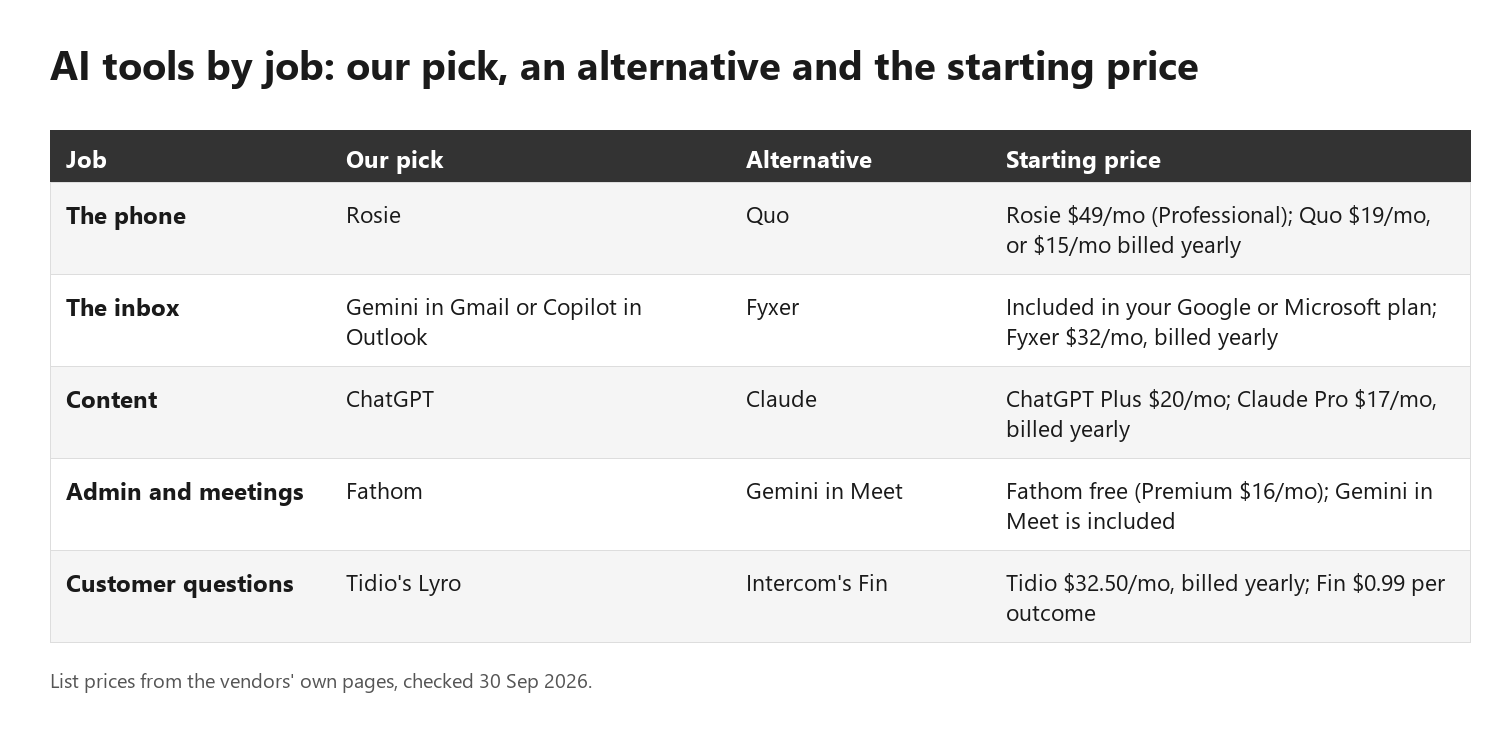
There are 5 jobs where AI saves a small business real time: the phone, the inbox, content, admin and customer questions. For each one, here’s our pick, one alternative and one line on what it won’t do.
Each pick is the one we’d try first for a team of about 6. The alternatives suit other setups, for example a business that wants a new business phone number as well as the AI.
1. The phone
Pick: Rosie. It answers calls 24/7, takes messages and texts callers an appointment link. The Professional plan is $49 a month for 250 minutes; booking straight into your calendar starts on the $149 Scale plan.
Alternative: Quo. It’s a business phone system with an AI agent, Sona, built in: from $19 per user per month ($15 billed annually), with 1,000 free credits (about 10 AI-handled calls). Auto-replies to missed calls are included on every plan, including Starter.
What it won’t do: it won’t quote a job it knows nothing about, and it shouldn’t handle an emergency. Tell it when to pass the call to a person.
2. The inbox
Pick: the AI in Gmail or Outlook you already pay for. Gemini in Gmail summarizes threads, drafts replies and proposes meeting times. Copilot in Outlook summarizes threads and drafts messages.
Alternative: Fyxer. It drafts replies in your tone and labels your email, in Gmail or Outlook. Pro is $32 per person per month billed annually, or $49 month to month.
What it won’t do: it won’t know your prices or your policies unless you tell it, so every draft needs a read before you hit send.
3. Content
Pick: ChatGPT. Plus is $20 a month for one person. For a team, ChatGPT Business is $20 per user per month billed annually or $25 monthly, with a 2-seat minimum.
Alternative: Claude. Pro is $17 a month billed annually or $20 monthly, and a Team standard seat is $20 per seat per month billed annually or $25 monthly.
What it won’t do: it doesn’t know your business, and it will state a wrong fact with total confidence. You edit, you check, you publish.
4. Admin and meetings
Pick: Fathom. The free plan records and transcribes your calls and writes a summary right after. Premium is $16 per user per month billed annually or $20 monthly.
Alternative: Gemini in Meet, which comes with Google Workspace Business Standard and up, so you may already have it.
What it won’t do: a summary isn’t a follow-up. Someone still has to send the proposal and chase the invoice.
5. Customer questions
Pick: Tidio’s Lyro. A website chat agent that answers from your own help content and hands off to a person. On its own, it starts at $32.50 a month billed annually, or $39 month to month, for 50 AI conversations.
Alternative: Intercom’s Fin. It charges $0.99 per outcome, with a minimum of 50 outcomes a month, and works with other help desks too.
What it won’t do: it’s only as good as the answers you give it. Writing those answers is half the work of an ai chatbot for businesses done properly.
AI business software for the phone
If you miss calls, the phone is the first job to fix, because a caller who can’t reach you often tries the next business on the list. There are 2 kinds of AI business software for it:
- An AI receptionist. It answers every call, handles common questions, takes the details and books or passes on the job.
- Missed-call text back. When you can’t pick up, the caller gets a text asking what they need. It’s cheaper and simpler.
Start with text back if you miss a handful of calls a week. Move to an ai receptionist for small business when missed calls are costing you real jobs.
Honest limit: callers can tell it’s AI. A caller with a complicated problem should still reach a person the same day.
AI tools for the inbox and admin
For most owners, the AI inside Gmail or Outlook covers the inbox, and a dedicated assistant pays off only if you write dozens of similar replies a day. We compare the best AI email assistants, split by Gmail and Outlook, in a separate guide.
Admin is the quieter time sink. A meeting recorder handles the notes; copying details between apps needs them connected, which we cover below.
AI tools for an ecommerce business
An online store gets the most from AI in 3 places: product descriptions, support chat and review replies.
- Product descriptions. If you’re on Shopify, its AI tools, including the Sidekick assistant, are free on every plan. On WooCommerce, ChatGPT or Claude does the same job: paste in your specs and ask for a draft.
- Support chat. A chat agent handles “Where’s my order?” well. Tidio and Fin, above, both connect to Shopify and WooCommerce.
- Review replies. Let the assistant draft each reply, and have a person read it and post it.
The limit: AI will invent a fabric weight or a battery life if you don’t give it one. Check every number before it goes live.
What a sensible monthly AI budget looks like
For a 6-person business, a sensible AI budget is about $90 to $125 a month on top of the email plan you already pay for. These are list prices checked on 30 Sep 2026, billed annually where offered.
| Job | Tool and plan | List price | Monthly cost for 6 people |
|---|---|---|---|
| Email, docs, Gemini | Google Workspace Business Standard | $14 per user | $84 (you likely pay this already) |
| Content and research | ChatGPT Business, 2 seats | $20 per user | $40 |
| Phone | Rosie Professional | $49 flat | $49 |
| Meeting notes | Fathom Free | $0 | $0 |
| Website questions (optional) | Tidio Lyro | from $32.50 | $32.50 |
| New AI spend | $89, or $121.50 with the chat agent |
Only the 2 people who write the most get a paid chat seat.
A sensible pattern to aim for: a paid chat seat only for the people who write proposals and do research, a free meeting recorder for client calls, and one workflow tool, such as n8n, to pass details between them.
What to skip, and what AI won’t do
There are 4 kinds of AI tools most small businesses can skip:
- Single-purpose writing apps that do what ChatGPT or Claude already does, for a second bill.
- A second chat subscription for the same person. Pick ChatGPT or Claude, not both.
- AI upgrades on tools you open once a month. The add-on won’t make you use the tool more.
- “Autopilot” tools that promise to run your business. Without a clear process to follow, they automate the mess.
A common pattern: a team pays for a standalone AI writing app, finds that ChatGPT or Claude writes the same drafts, and cancels a few months later because nobody opens it. Before you add a tool, check whether one you already pay for does the job.
The honest limit: AI won’t fix a bad offer or a broken process. If leads go cold because nobody owns follow-up, a faster reply helps, but someone still has to own the callback.
Why the tools don’t talk to each other, and what connecting them looks like
Each tool keeps its own data, so the message your AI receptionist takes doesn’t reach your CRM until someone connects them. Buying the tools is the easy part. Getting them to talk to your CRM, calendar and phone is where an ai automation agency earns its fee.
Connecting them usually means a workflow tool such as Zapier, Make or n8n in the middle. A simple example has 3 steps:
- The AI receptionist takes a call and captures the details.
- The workflow adds the lead to your CRM and texts you a summary.
- If nothing is booked in 2 days, it sends a follow-up.
You can build that yourself; read up on n8n pricing before you choose a platform. Or we build it for you: we pick the tools, set them up, connect them to your CRM, calendar and phone, and run them. You won’t get homework from us.
Here’s what that looks like with proposals. When call notes are retyped by hand into every proposal, the retyping is most of the work. When the meeting recorder’s summary flows straight into a proposal template, the job shrinks to checking and editing a draft.
FAQ
What is the best AI tool for a small business?
The best AI tool for a small business is the one that takes over the job losing you the most time or customers. For many service businesses, that’s the phone, so an AI receptionist or missed-call text back comes first. For office-based teams, the AI already inside Google Workspace or Microsoft 365 is the best place to start.
Is ChatGPT enough?
Yes, for writing, research and planning, ChatGPT or Claude covers most of what a small team needs. It won’t answer your phone, reply inside your inbox or update your CRM on its own. Most businesses keep one chat tool and add a single tool for the job that loses them the most customers.
Are free AI tools safe for customer data?
No, not by default. On OpenAI’s individual plans, your chats may be used to train models unless you turn that off, while ChatGPT Business doesn’t train on your data. Claude’s consumer plans only use chats for training if you allow it. Keep customer data in business plans with training switched off.
How much should a small business spend on AI?
A 6-person business can cover the main jobs for about $90 to $125 a month in new spend, based on list prices checked on 30 Sep 2026, on top of Google Workspace or Microsoft 365. Start with one paid tool for your biggest time sink, run it for a month, and add the next only if it earned its keep.
Do I need a developer to use AI tools?
No. Every tool in this guide is built for owners and sets up in an afternoon. You need help when you want the tools to work together: a call logged in your CRM, a chat lead booked into your calendar, a follow-up sent automatically. That connecting work is where a developer or an automation partner saves you time.
Will AI replace my staff?
No. In a small business, AI takes over the repetitive part of a job: the first reply, the meeting notes, the product description draft. Your people still handle the judgment calls, the unhappy customer and the sale. Most owners find the same team gets through more work and spends less of the evening on email.
Not sure which job to start with?
Most owners aren’t. Tell us how your week goes, and we’ll point to the 2 or 3 tasks worth handing to AI first.

Ahsan Shahid, CEO
Ahsan spent 12+ years as a lead developer on Drupal and WordPress projects before building the team behind Tech Artisans, and still reviews the technical work on client projects.
More about us