
No-code and low-code automation platforms compared
- AI Automation
- 9 min read
- Ahsan
For most small businesses, the choice between no-code automation platforms comes down to 3 tools. Zapier is the easiest and connects to the most apps. Make gives you more control at a lower cost per step. n8n is the most flexible and the only one of the 3 you can host yourself. If your business already runs on Microsoft 365, Power Automate may be partly included in what you pay. Below we compare them on price, apps, AI and upkeep.
We set up Zapier, Make and n8n for clients as an ai automation agency, and we don’t sell any of these tools. So this comparison is about fit, not commission.
What a no-code automation tool does
A no-code automation tool moves information between your apps when something happens, without anyone writing code. You pick a trigger (“a new form is submitted”) and the actions that follow, in a visual editor.
An example, in 4 steps:
- A customer fills in the quote form on your website.
- The tool adds them to your CRM as a new lead.
- It sends them an email confirming you got the request.
- It adds a row to the spreadsheet you use to track quotes.
Done by hand, someone types the same details into 3 places, and it’s the kind of work that slips on a busy day. Done by a tool, it happens in seconds, every time. This is the core of data entry automation: the same facts typed once, not 3 times.
The no-code automation platforms compared
The 5 no-code automation platforms a small business is most likely to use are Zapier, Make, n8n, Microsoft Power Automate and Activepieces. They differ most in how they charge, so read the “pricing unit” column first.
| Platform | Pricing unit | Entry paid price | Free option | Apps, as published | AI steps | Self-hosting |
|---|---|---|---|---|---|---|
| Zapier | Task: each action step that runs (triggers are free) | $19.99 a month billed yearly, 750 tasks | 100 tasks a month, 2-step Zaps only | 9,000+ | Yes, 1 to 5 tasks per AI step | No |
| Make | Credit: each module action, including the trigger check | $16 a month, or $12 billed yearly, 10,000 credits | 1,000 credits a month | 3,000+ | Yes, with Make’s AI or your own key | No |
| n8n | Execution: 1 full workflow run | $24 a month, or $20 billed yearly, 2,500 executions | Free if you host it yourself | 2,279 on its integrations page | Yes, with your own key or n8n’s Gateway credits | Yes |
| Power Automate | Per user license | $15 per user a month, paid yearly | Standard connectors with some Microsoft 365 plans | 1,400+ | Yes, with Copilot credits | No |
| Activepieces | Credit: 1 per run, AI steps extra | $20 a month flat, 10,000 credits | 1,000 credits a month | 760+ | Yes, 2 to 20 credits per AI step, or 1 with your own key | Yes |
All prices and counts from each vendor’s own pricing or integrations page, checked 30 September 2026 (Make re-checked 22 October 2026; n8n in US dollars, as US visitors see it and as in our n8n pricing guide).
We reach for n8n first for most clients, because it charges per run rather than per step, so the bill stays low as workflows grow. If you’d rather have a simpler editor you can change yourself, we build in Zapier or Make instead, and we settle which on the first call.
Zapier: best for, watch out for
Zapier is best for owners who want to set up a simple automation themselves this afternoon. It’s the easiest editor of the group and lists more than 9,000 apps, so the odd tools your business uses are most likely there.
Best for: short workflows between popular apps, owners without technical help, and teams that value ease over price.
Watch out for: the task count. Every action step that runs uses at least 1 task, and AI steps use 1, 3 or 5 tasks depending on the model tier. Filters, Paths, Formatter and Delay steps are free, which helps. If you run out, Zapier switches you to pay-per-task billing, up to 3 times your plan’s task limit, and then your Zaps stop. The free plan only allows 2-step Zaps, so the 4-step example above needs a paid plan.
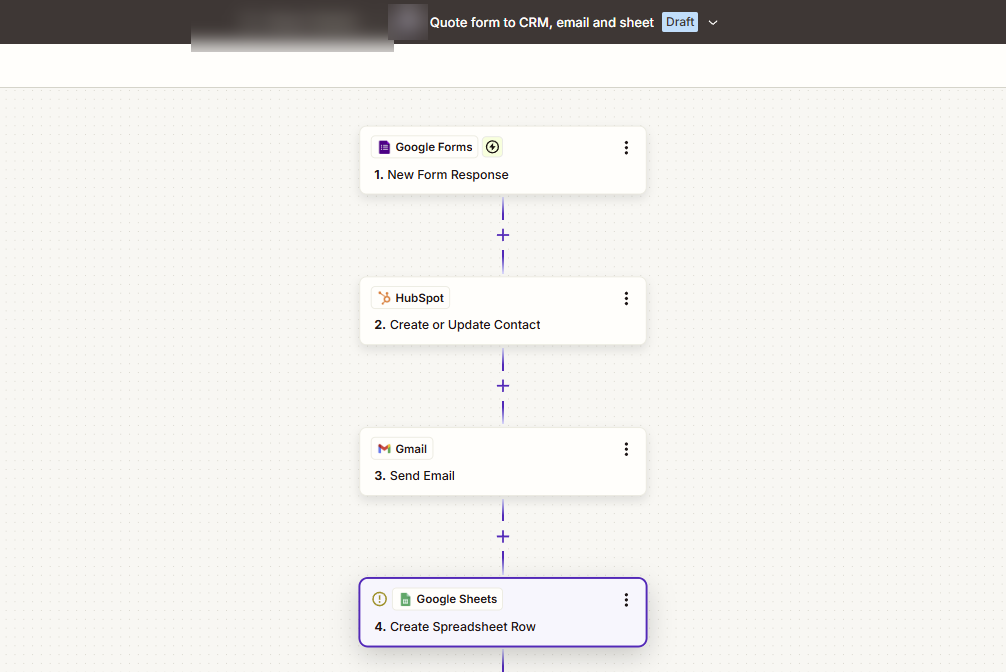 Our test quote-form workflow as a 4-step Zap: a Google Forms response creates a HubSpot contact, sends a Gmail confirmation and adds a Google Sheets row.
Make: best for, watch out for
Make is best for workflows with branches, loops and data clean-up, at a lower price per step than Zapier.
Best for: longer workflows, owners or staff who don’t mind a steeper learning curve, and anyone watching cost per step.
Watch out for: 2 things. First, the trigger check itself uses a credit each time it looks for new data, even before any action runs. Second, when you run out of credits, your scenarios stop until you add more, though incoming webhooks queue up to a limit. Routers and error handlers don’t use credits, and you can buy extra credits in bundles.
n8n: best for, watch out for
n8n is best when you want the most control, long workflows at a flat price per run, or your data on your own server. It charges per execution, meaning 1 complete run of a workflow however many steps it has. A 12-step workflow costs the same as a 2-step one.
Best for: long or AI-heavy workflows, businesses with someone technical on hand, and anyone who wants to self-host. The self-hosted Community Edition is free for your own internal business use.
Watch out for: 2 things. n8n assumes a bit more technical comfort than Zapier, and self-hosting means you own the server, the updates and the backups. On n8n Cloud, once you hit your monthly limit, new runs fail with an error until the month resets or you upgrade. Our guide to n8n pricing adds up the full monthly bill, including servers and AI usage.
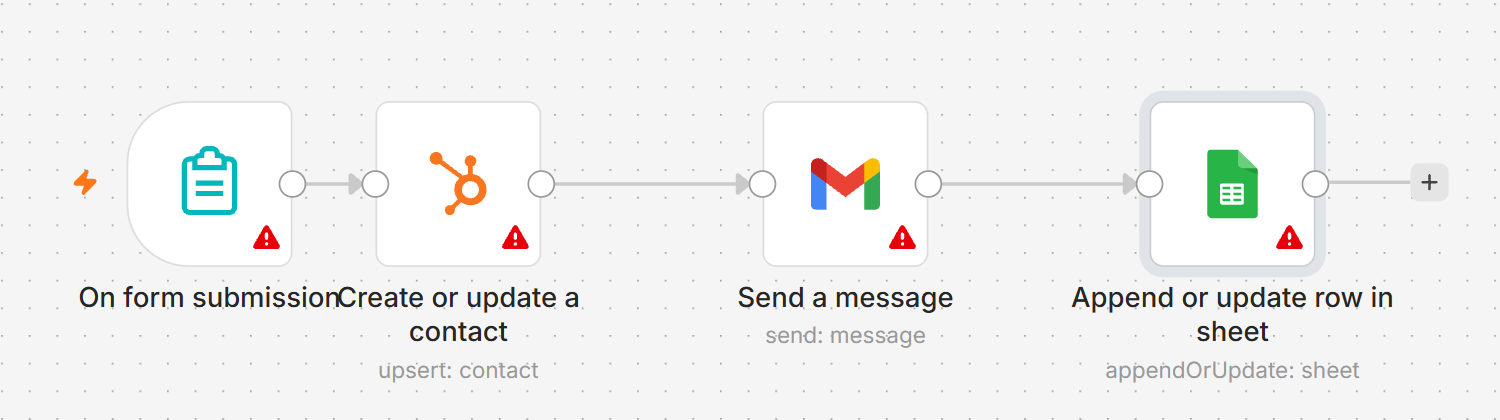 The same 4 steps in n8n. The red triangles only mean no accounts are connected yet.
Microsoft Power Automate and Activepieces
Power Automate fits businesses that already live in Microsoft 365, and Activepieces fits owners who like n8n’s per-run pricing but want a simpler editor. Both are worth a short look.
Microsoft Power Automate. Some Microsoft 365 licenses include limited Power Automate rights, but only for standard connectors such as Outlook, SharePoint and Teams. Premium connectors need Power Automate Premium at $15 per user a month, paid yearly. It’s licensed per person, not per run, so it gets expensive as more staff need it. It’s also strongest inside Microsoft’s own apps. AI steps in Power Automate now run on Copilot Credits, and from 1 November 2026 Microsoft stops selling the older AI Builder credit add-ons.
Activepieces. Activepieces is a newer, open-source tool. It charges 1 credit per run however many steps the run has, and AI steps cost extra: 2, 10 or 20 credits depending on the model, or 1 credit if you connect your own AI key. The paid plan is $20 a month flat for 10,000 credits and up to 5 users, and you can host it yourself. The catch is fewer integrations than the big 3.
Low-code vs no-code: when you need a developer anyway
You need a developer when a workflow has to do something the tool’s ready-made blocks don’t cover. No-code means you drag blocks. Low-code means you can also drop in a few lines of code where a block falls short. Zapier, Make and n8n all have code steps for exactly this reason.
There are 4 signs you’ve crossed from no-code into low-code:
- The app you need isn’t listed. You’ll connect to its API directly, which means reading its documentation and handling logins.
- The data needs real reshaping. Splitting addresses, matching records across 2 systems or cleaning up messy spreadsheets often needs a code step.
- Errors have to be handled, not ignored. What happens when the CRM is down for 5 minutes? A good workflow retries and tells someone.
- You want to self-host. Running n8n or Activepieces on your own server is a server admin job, not a drag-and-drop job.
Code isn’t free on every platform either. Make charges 2 credits per second of code execution time, for example.
How the pricing units compare in practice
The same workflow can cost 1 unit on one platform and 4 on another, because each platform counts something different. Take the 4-step quote-form workflow from earlier (1 trigger and 3 actions), run 500 times a month:
| Platform | How it counts 1 run | Units for 500 runs a month |
|---|---|---|
| Zapier | 3 tasks (the trigger is free) | 1,500 tasks |
| Make | 4 credits (the trigger check counts) | 2,000 credits |
| n8n | 1 execution | 500 executions |
| Activepieces | 1 credit | 500 credits |
| Power Automate | No per-run charge; licensed per user | 1 Premium license if it uses premium connectors |
Counting rules from each vendor’s help or pricing page, checked 30 September 2026.
Put against the entry plans in the first table, 1,500 tasks is more than Zapier’s 750-task plan, 2,000 credits fits Make’s Core plan with room to spare, 500 executions fits n8n Starter, and 500 credits fits the free 1,000 credits a month on Activepieces. Add 5 more steps and Zapier and Make go up, while n8n and Activepieces stay flat.
That looks like this in a typical build:
A typical case is a 3-step lead intake workflow that runs about 500 times a month: it needs a Zapier plan above the 750-task tier, but fits inside n8n Starter’s 2,500 executions. Recheck both pricing pages before you compare.
Our ai tools for business guide covers the AI tools that often sit inside these workflows, and what they add to the bill.
Honest limits of automation platforms
Automation platforms don’t fix a messy process, and they break when an app changes. If your quote process lives in 3 people’s heads, automating it just makes the confusion faster. Map it on paper first.
The breakage is the part owners don’t expect. An app renames a field, changes its login method or retires an old connection, and a workflow that ran for months stops. Sometimes it fails loudly. Sometimes it runs and quietly sends blank data. A common case: a CRM renames a field, the workflow keeps running, and new leads arrive with blank phone numbers. The fix is quick; noticing is the hard part.
No-code means no programming, not no work. Someone still maps the process, builds it and fixes it when an app changes, which is what our ai workflow automation covers. A good setup sends every failed run to an alert channel that someone checks each business day. Ask any builder how they watch for failures and how fast they respond.
FAQ
What is the easiest automation tool?
Zapier is the easiest for most owners. The editor walks you through each step in plain language, and it lists more than 9,000 apps, so your tools are probably there. The free plan lets you test 2-step Zaps with 100 tasks a month. For longer workflows you’ll need a paid plan, and costs climb with every action step that runs.
Is n8n better than Zapier?
No, not for everyone. n8n is better for long workflows, AI-heavy work and self-hosting, because it charges per run instead of per step. Zapier is better if you want the easiest setup and the widest app list. If nobody on your team is comfortable with a little technical work, Zapier’s higher price often buys back more time than it costs.
Is there a free no-code automation platform?
Yes. Zapier’s free plan gives you 100 tasks a month for 2-step Zaps, and Make and Activepieces each give you 1,000 credits a month. Self-hosted n8n is free software too, though you pay for the server. Free plans suit testing an idea. A business running workflows every day usually needs a paid plan.
Can I move my Zaps to Make or n8n?
Yes, but plan on rebuilding them by hand. The trigger and action logic carries over in your head, not in a file, so list every Zap, what starts it and what it does before you begin. Run the old and new versions side by side for a week before you switch the old one off.
Do no-code tools work with AI?
Yes. All 5 platforms in this guide can add an AI step, for example to sort an email, pull details from an invoice or draft a reply. You either pay the platform in extra tasks or credits, or connect your own OpenAI, Anthropic or Google key and pay that provider directly. Check the AI price per step before you build.
Who fixes an automation when it breaks?
You do, unless you’ve paid someone to. The platforms keep their own servers running, but they don’t fix your workflows when an app changes a field or a login expires. Turn on error alerts in whichever tool you use, and decide now who gets that email. A broken workflow nobody notices is worse than no workflow.
Tell us what’s eating your time
Not sure which platform fits, or whether you need one at all? Tell us which tasks eat your week. We’ll tell you which tool fits, what it would cost to run, and whether we’d build it or you should.

Ahsan Shahid, CEO
Ahsan spent 12+ years as a lead developer on Drupal and WordPress projects before building the team behind Tech Artisans, and still reviews the technical work on client projects.
More about us